

1.
Visit Printsgram.com
2. Log into your Instagram account.
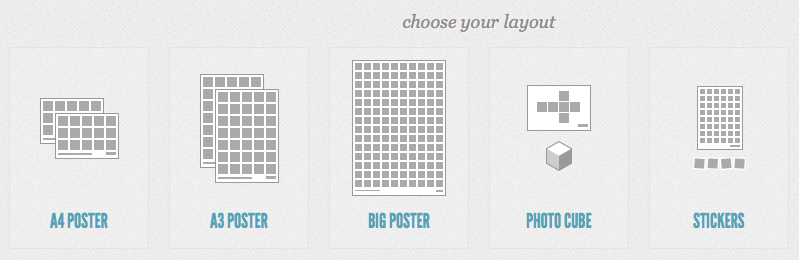
3.
Choose which poster layout you’d like to use.
4. Name your poster {eg photo a day photos}.
5. Drop and drag your photos into the poster {or double click the picture for them to automatically be added}.
6. Once completed, click create.
7. Download your PDF to your computer {click the download button on the left of your screen}
8. If you want to have it printed to display in your home, just send it off to somewhere like Officeworks {for Australians}. If you want to use it on your blog you’ll probably have to resize it to make it small enough to load properly. I do this in photoshop. Alternatively, just right click the image {when you’re on the same page you download it} and save it to desktop for a smaller version to use online.
Enjoy! Have a great weekend everyone!

I'll admit I've never used Instagram. If it's this awesome, I will have to join in it somehow! =)
Lemanie's Randomness Blog
Great advice! Thanks.
I love this! I think it would be the perfect accent for our hallway wall. Thank you for sharing.
You rock Chantelle. Thank you.
x
Love it.. I got a new iphone case from http://www.casetagram.com after seeing the link on here a few weeks ago, it is so cool, everyone who sees it want one too.
Thanks for all the great links and info.
Cherie x
I know it seems like the world (or our part of it) is OBSESSED with apples but if – she says with tongue firmly in cheek- you're a leader & not a follower is there an 'app' where you could download your photos taken with a camera similar to instagram? 😀 Thanks heaps
Do you want instagram? Its now available for android….Pixlr-o-matic is a similar program – has filters etc. Picplz is also an app that can be used.
I use Instagram on my Samsung tablet, android….give it a try 🙂
It seems as if you read my mind–I'd been wondering how to share my instagram pics in my blog. I will definitely be doing this really soon.
Thanks for the tutorial 🙂
Mandi@ the Sassy Fit Mom
Mandi, if you go to http://web.stagram.com/ and login to your account, you can view all your Instagram pics individually on your computer and save individually if you like, so you can add them to your blog later whenever you like. Otherwise I email them to myself.
Thanks so much for this – I have been wondering for ages how I can make this happen !!!
Have the best day ever !
Me
Yes! I made one of these a few months ago, and it always grabs everyone's attention. My mum LOVES it and whenever she is here, can't help but look at it for ages, looking through all the photos. Think I even took an instagram pic of it too. (virginia1975 on instagram)
I love using instagram – its quick and easy. Plus i trialed 100 cameras in one( extra filters you can buy – app) – with a bit of getting used to the full version would probably be great. I dont think i use instagram correctly though – i can never see all my pics on my computer – only the most recent one – i noticed someone mentioned a link you can use so im going to try it. 🙂
I am already looking forward to getting this done for when my little girl is 1 .. She is only 4.5 mths at the moment!! A collage of her first year through Instagram! Than you! X
I love that you have so much color in your photos! This would be a great poster on my walls! I'm definitely going to try it out 🙂
I want to do the poster thing, But I don't have pics on my instagram.. I don't like the way my camera on my phone takes pics. Can you do it a different way ?
Thanks ╮(╯▽╰)╭
I found another website that is pretty good..http://www.photovisi.com/
It's super duper easy !!!
Thanks for this link. I tried it and it sure is easy to use.
That's so cool! Thanks for making it so simple!
Thanks for the tip – you always make things seem so much easier!
Clever! I have just been doing mine in photoshop, but will use this tip next time! thanks! xx
Fabulous, what a great idea! Thanks so much for sharing.
Thanks for sharing, this was very useful!
XO J
http://www.style-worthwhile.com
great I need to check this place! thank you for sharing!
Thank you for sharing this link! I posted it on my blog today too. It's a fantastic idea for Mother's Day – I'll probably print one off of pictures of Eli for my mom. Have a great weekend!
Am I the only one this isn't working for? Usually I'm super savvy at this stuff, but once I select all my images I only get the option to 'hand over the cash'… no download option.
Hi,
I really love your blog design! How did you manage to input the words in color?
This is an awesome tip and I def have to try it out!!
Glad I found your blog,
greetz from New York!
Hi, I could really use your help. I'm a longtime reader and I need help getting the message out about a person who needs support. Can you read my blog about him and tweet/post if you feel inspired to? http://www.mybunnygoboom.com/2012/05/strange-sex-nat-brody-must-read.html
Great idea!
I wish I had instagram.
Cool – thanks for the link
Thank you thank you thank you!
Printsgram really is great. As I said on a comment on your last post about things to do with instagram photos, I used it last year to make an A1 poster and had it printed at officeworks. I still love walking past it every day. Here's my post from back then about it: http://madanddave.wordpress.com/2011/12/09/instagram-photo-poster/
I love this! Thank you! Pinning this for future reference 🙂
I'm glad you posted this as I didn't know about it but I'm having problem using it as I can't type my title or even click start 🙁
I'm having the same problem – can't get past hte title or click start. Too bad because it looks cool otherwise.
Me too! Cant get past the title page!!! Frustrating!!!!
I'm glad its not just me but the problem is that there is no one to ask for help :(… such a shame
Me too! Argh, was all excited, Im sure its something simple!
Fantastic Post! I will be sharing this one thankyou!
Your advice is always amazing!! I will get into Instgram one day, love Posie
Gorgeously bright and colourful!
Yours is so colourful and pretty!
You're amazing! I was just about to Google how to do this very thing when I happened across this post! Thank you!
Love this post, I will definitely be doing this very soon!
Thank you for sharing!
I hope you don't mind, I featured it on my Friday Favorites post today:)
<3 Leney
http://agirlnamedleney.blogspot.com/2012/05/friday-im-in-love_18.html
I did this yesterday! I worked great–thank you!! Now my question is how to best display it. 🙂 I took it to Michael's thinking they'd have an easy solution and….they didn't. Even the guy in custom framing. Any suggestions on how to reinforce this or frame it (since the a1 size is not as standard, at least here in the US?) 🙂
I did this yesterday! I worked great–thank you!! Now my question is how to best display it. 🙂 I took it to Michael's thinking they'd have an easy solution and….they didn't. Even the guy in custom framing. Any suggestions on how to reinforce this or frame it (since the a1 size is not as standard, at least here in the US?) 🙂
Thank you so much!! I saw one of these on Pinterest recently. Went to places like SeaWorld, the zoo, and the carnival with the grandchildren and wanted to make one myself. Whoop, thanks!
Is there a way to organize your instagram photos on your computer? It will take a LOT of time for me to find them all and sort them, because I didn’t do it from the beginning. Ugh.
That’s cool, I often wondered how people were doing this I’ll definitely give it a go soon. Thanks for sharing.
Amazing! Thanks!
You should have a look at http://www.postercandy.com.au if you want to see this done really well in Australia. They only launched their service a few weeks ago.
really good resource will definitely give it a try i have a meet next week i will look out for poster options from these if it works well Cheers
Thanks for helping me out. I really needed this one.
Hey this is such an awesome idea! I would love to share this on my blog to get this around more!
I use the IKEA NYTTJA Frame
$9.99
Frame, height: 74 cm, Picture, width: 50 cm, Picture, height: 70 cm
I have to trim it down to fit – but it looks good and for $10 its a cheap and lightweight frame.
For the 20 * 30 posters.